
.jpg?width=3000&height=17&name=gold%20bar%20(thin).jpg "Gold Bar")

 By
By 
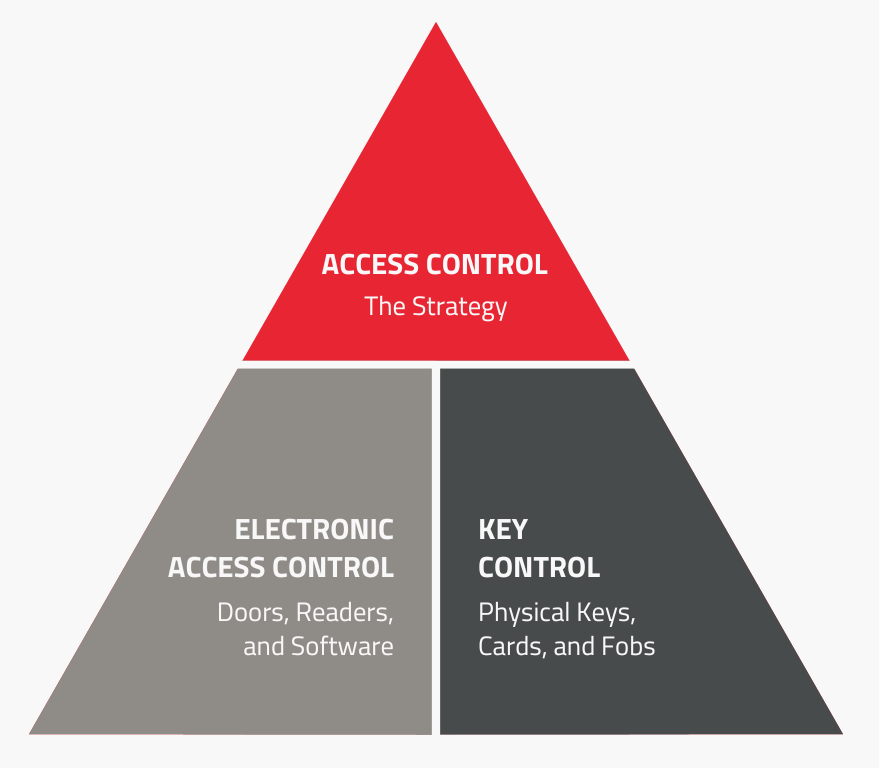
If you're researching physical security, you've likely come across both key control and access control. At first glance, they can seem like competing approaches, and you may be wondering which is right for your organization. In fact, it's not necessarily an either-or decision. Let's look at what each one does and how both can support a comprehensive access control strategy.
Access Control: The Strategy
Both key control and electronic access control support broader physical security objectives. To understand how they differ, it's important to distinguish access control as a security concept from electronic access control as a solution.
Access control is more than a term describing electronic door locks. By IBM’s definition, “Access controls are the policies, tools, and processes that govern user access to sensitive data, computer systems, locations and other resources.”
Policies
The purpose of access control policies is to define:
-
Who can access a location, asset, or resource
-
What level of access they have
-
When they can access resources
-
Under what conditions access should be granted or denied
Credential Types
The tools someone could use to access information, systems, or locations include:
-
Mechanical keys
-
Access cards
-
Key fobs
-
Mobile credentials
-
Biometric authentication
-
PINs and passcodes
Electronic Access Control: Doors, Readers, and Software
Electronic access control solutions, often called keyless entry or digital locks, are what many people think of when they hear the term “access control.” Electronic access control is one way organizations enforce access control policies for physical spaces. The Security Industry Association (SIA) defines it as “a basic physical access control system [that] includes a credential, a reader, a locking device, a door position switch (DPS), a request to exit (RTE) device, and a controller.”
Electronic access control allows organizations to:
-
Assign permissions by user, role, door, area, or schedule
-
Update access rights without rekeying a lock
-
Create records of access events
-
Set up time-based or location-based access rules
Electronic locks can be a critical part of a building’s technology ecosystem, but they don’t eliminate the need to manage physical keys.
Key Control: Physical Keys, Cards, and Fobs
Key control is the practice of securing, managing, and tracking physical access assets such as keys, cards, and fobs. It supports an organization's broader access control strategy by helping ensure those credentials are issued, used, and returned appropriately.
As ASIS points out:
All locks are mechanical. Whether the lock is purely mechanical, electromechanical, or electronic, something must move to cause locking or unlocking of critical elements. Even if there are software-controlled components, everything comes down to one or more parts.
Organizations often implement key control using electronic key management systems, which automatically track who has a key, when it was issued, and when it’s due for return. This information provides a verifiable record to help with employee accountability, investigations, and audits.
Common Misconceptions
Because electronic access control and key control often overlap, you may find yourself believing some of the following misconceptions.
“Electronic access control eliminates the need for key control.”
Electronic access control doesn't eliminate the need for physical keys. Many organizations still use mechanical keys, backup keys, vehicle keys, and equipment keys. Even in highly automated environments, physical access tokens often need to be issued, tracked, recovered, and secured.
“Access logs tell the whole story.”
Access logs can provide valuable information about when and where someone accesses a lock but may not provide a full audit trail, including who currently has a physical key, card, or fob and why they have it.
“Physical keys are becoming obsolete.”
Electronic access control is becoming more common, but most organizations still manage a combination of physical and electronic access tokens. Facility keys, vehicle keys, cards, fobs, and backup credentials can create risk if they aren’t properly tracked and managed.
Real-World Scenarios
Electronic access control and key control complement each other in daily operations. Here are a few examples:
Scenario 1: Employee Offboarding
-
Electronic access control revokes digital authorization to buildings and restricted areas
-
Key control verifies that the employee has returned any physical building keys, vehicle keys, access cards, or fobs before leaving
Scenario 2: Maintenance or Service Work
-
Electronic access control allows a maintenance technician to enter the building during their scheduled shift
-
Key control issues and tracks the keys to apartments, storage rooms, and vehicles required to complete the job
Scenario 3: Contractor Access
-
Electronic access control limits the contractor's access to specific entrances and working hours
-
Key control tracks any mechanical keys or backup credentials issued for areas not covered by the electronic access control system
Scenario 4: Vehicle Fleet
-
Electronic access control restricts access to the fleet office or vehicle storage area
-
Key control records when someone checks out and returns a vehicle’s key
Scenario 5: Emergency Access
-
Electronic access control manages access during normal operations
-
Key control secures and tracks emergency master keys or override keys used during power outages, system failures, or emergency response
Building a Complete Access Control Strategy
Both electronic access control and key control solutions support the same security goals:
-
Protect people, property, and assets
-
Limit access to authorized individuals
-
Support investigations and audits
-
Reduce risk from lost, shared, or misused physical access credentials
Together, these solutions help organizations create a more comprehensive access control strategy. If you’ve been focusing on either electronic access control or key control but not an overall access control strategy, where do you begin? Start with these steps:
-
Review access requirements: Who needs access, to what, and why?
-
Account for every access asset, not just doors or electronic credentials
-
Create clear processes for issuance, use, return, and revocation
-
Review permissions and physical assets during role changes and offboarding
The strongest physical security programs don't rely on a single technology. By combining electronic access control with key control, you can manage both digital access permissions and physical credentials.

