
.jpg?width=3000&height=17&name=gold%20bar%20(thin).jpg "Gold Bar")

 By
By 
When contractors or vendors need to perform work in your facility, what’s the best way to provide the access they need? Do you give them the key? How do you make sure they return it?
Here are some best practices for using your key control system to manage third-party key access while keeping your facility secure.
Escort the Contractor or Vendor
When possible, check out the key on behalf of the contractor or vendor and escort them to the area or assets they need to perform their job. When checking out the key(s), select the appropriate “Vendor” or “Contractor” checkout reason. Depending on your system’s settings, it may also prompt you to add a due date or note, such as the vendor’s name or a description of the work they’re performing.
If your system doesn’t have “Vendor” or “Contractor” checkout reasons set up, an administrator can add them by navigating to Administration > Choice List Setup > Checkout Reasons. When setting up each checkout reason, they can also toggle on these options:
-
Due Date Capture — Prompts the user to set a return date/time for the key
-
Data Capture — Prompts the user to add a custom note when selecting the checkout reason
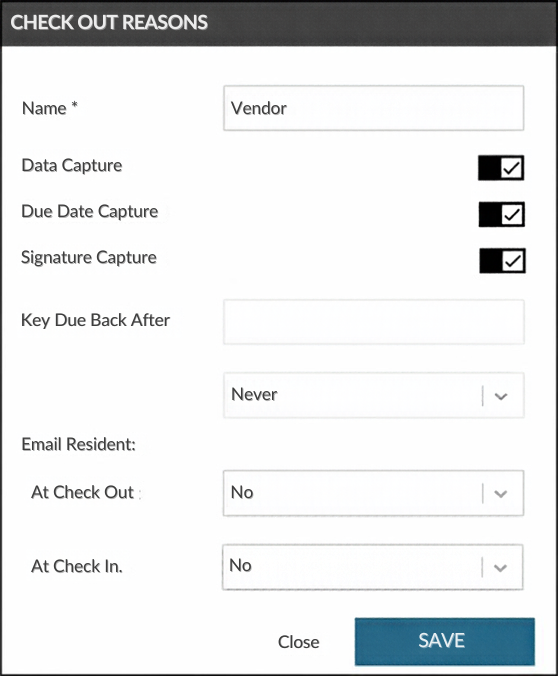 Checkout reasons screen. May vary by software version.
By keeping the key with an authorized employee, you’ll maintain control while still allowing the contractor or vendor to complete their work.
Verify Each Person’s Identity
If a contractor or vendor needs independent access, verify the identity of each person by inspecting their driver’s license. Print a receipt verifying that they’ve received the key(s) and have each party sign.
If you plan to have them retrieve keys from the system on a recurring basis, require multifactor authentication, which requires more than one form of verification before granting access.
If your system includes a motion-activated camera, it can provide an additional way to verify who’s checking out a key. It also provides you with a form of tangible documentation if someone steals, loses, or misuses a key.
Limit Access to Only What’s Needed
Use roles and profiles to limit access to only the keys, locations, and time frames the contractor or vendor needs to perform the specific job you hired them for. The following are specific features you can implement:
-
User roles: Set up roles for common contractor or vendor types, which allows you to configure permissions for multiple people. If access requirements change, you can update the role rather than each individual’s profile.
-
Daily access schedules: Control the days and hours users can access keys. These limits help ensure third parties only have access to keys during the time frame required for their assigned work.
-
Individual user accounts: When multiple contractor or vendor employees require keys, set up individual user accounts to manage each person’s access to different keys or locations.
It’s also important to deactivate user profiles as soon as the vendor or contractor is finished with their work. This best practice prevents future unauthorized access to keys they no longer need.
Review Reports
It’s important to review reports regularly to find any unusual or unexpected key activity. The Tag Activity or Key History reports (names vary by software version) are a good starting point. They give you a high-level view of who accessed a specific key, when, and why. They also show if the key was returned.
If you use checkout reasons such as "Vendor" or "Contractor" and create dedicated user roles for third-party users, custom reports can help you identify and review those transactions alongside other key usage data.
When contractors and vendors need temporary access to your facility, your key control system can help you provide access while enforcing accountability. Third parties can complete their work efficiently, and you’ll know who used each key, when, and why.
Frequently Asked Questions
Why is it important to manage contractors’ and vendors’ key access?
Contractors and vendors require special attention because they often need temporary or limited access to your facility, but they aren’t part of your everyday team. To maintain accountability, it’s important to verify their identity, limit access to the keys they need, and document who used each key, when, and why.
How can I limit contractor and vendor access to only the keys they need?
When possible, check out the required key from your key control system using a “Vendor” or “Contractor” checkout reason and escort the contractor or vendor while they’re on-site. If a third party needs independent access, create an individual user account and assign the appropriate permissions. Limit their access to the specific keys and locations required for the job.
What’s the best way to verify the identity of a contractor or vendor before issuing a key?
For one-time access, inspect the person’s driver’s license, print a receipt verifying they received the key, and have each party sign it. For recurring access, your system can help confirm a user’s identity through multifactor authentication, which requires more than one form of verification before granting access.
How can I track and document contractor or vendor key usage?
Use individual user accounts, checkout reasons, and reports to document who accessed each key, when they accessed it, why they needed it, and whether it was returned. If your system includes a motion-activated camera, it can also provide visual documentation of the person checking out the key and support your audit trail if a key is lost, stolen, or misused.
What alerts should I set up for contractor and vendor key access?
Set alerts and alarms for key activity that needs attention, such as overdue keys, unauthorized key removal, password misuse, power interruptions, or drawers left open past the allotted time. Notifications can be sent by email, text, or mobile push notification so your team can respond quickly to unusual activity.

