
.jpg?width=3000&height=17&name=gold%20bar%20(thin).jpg "Gold Bar")
 By
By 
QR codes are now part of everyday operations. Depending on your organization type and job function, you may use them for:
- Self-guided service processes
- Key tag identification
- Key control system access
- Customer or resident information and payments
- Package lockers
They speed up workflows, reduce staff burden, and provide a better customer experience. That's why businesses continue to adopt QR code-based processes. In fact, 59% of consumers now scan at least one QR code a day.
But as QR code use grows, so does the threat of quishing. If your organization uses QR codes, here's what you need to know.
What Is Quishing?
Quishing is a phishing scheme using QR codes. Attackers place them in a credible location, such as signage, buildings, or parking meters. Sometimes scammers will place a fraudulent QR code over a legitimate one.
A more recent scam involves criminals sending a package addressed to the recipient but with no sender information. It prompts the sender to scan a QR code on or in the package for more details.
When scanned, these QR codes typically redirect users to malicious destinations such as:
-
Fake login pages designed to capture credentials
-
Fraudulent payment portals
-
Malware delivery sites or app downloads
-
Forms intended to harvest personal or organizational information
The goal is usually to exploit trust in the QR code rather than technical vulnerabilities.
Why Criminals Use Quishing
Criminals target people where and when they’re most active, distracted, or comfortable. There are a few reasons quishing is becoming more common:
1. People Scan Without Thinking
With QR codes being an everyday part of life, scanning them is second nature. In fact, 73% of Americans scan them without verifying the source.
2. Many QR Codes Look the Same
While some QR codes feature branded designs or unique shapes, many are simple black-and-white squares. That makes it harder to identify QR codes that are part of a phishing scheme.
3. QR Codes Are Convenient
QR codes remove friction from an experience — no entering a URL, searching for the information you need, physically handing over your credit card, or interacting with a staff member. When you scan a QR code, it’s because it feels quick and easy, and criminals exploit that instinct.
4. Physical Placement Creates Trust
A QR code’s placement can make it appear trustworthy. For example, you expect to see QR codes in a:
-
Building entrance
-
Public-facing service kiosk
-
Parking/payment stations
-
Package lockers and delivery access points
Because it’s not unusual to see QR codes in these locations, they don’t automatically trigger red flags.
How to Reduce Quishing Risks in Your Organization
Protecting your organization doesn’t mean avoiding QR codes. After all, phishing doesn’t stop you from using email. You know what to look for to avoid falling for scams. Like any other security measure, using QR codes safely and effectively requires balancing security and convenience.
When QR codes are part of a defined operational process, it’s much easier to recognize suspicious activity. Here are a few ways to reduce the risk of quishing:
1. Familiarize Yourself With the Workflow
To spot signs of quishing, it’s important to know how your organization uses QR codes. For example, you might use them to identify key tags or retrieve keys. Your customers might use them to pay for service.
Knowing where QR codes appear and what they’re supposed to do makes it easier to recognize when something is out of place. Make sure you and your team understand:
-
Where QR codes appear
-
What systems or actions they connect to
-
How and when they’re created (e.g., printed with a QR code printer connected to your key control system when someone adds a new key)
-
Who’s responsible for printing and applying them, if using stickers
-
Any distinctive features of your organization’s QR codes, such as a unique shape or logo
-
Security features such as time-based rules, user restrictions, etc.
2. Inspect for Tampering
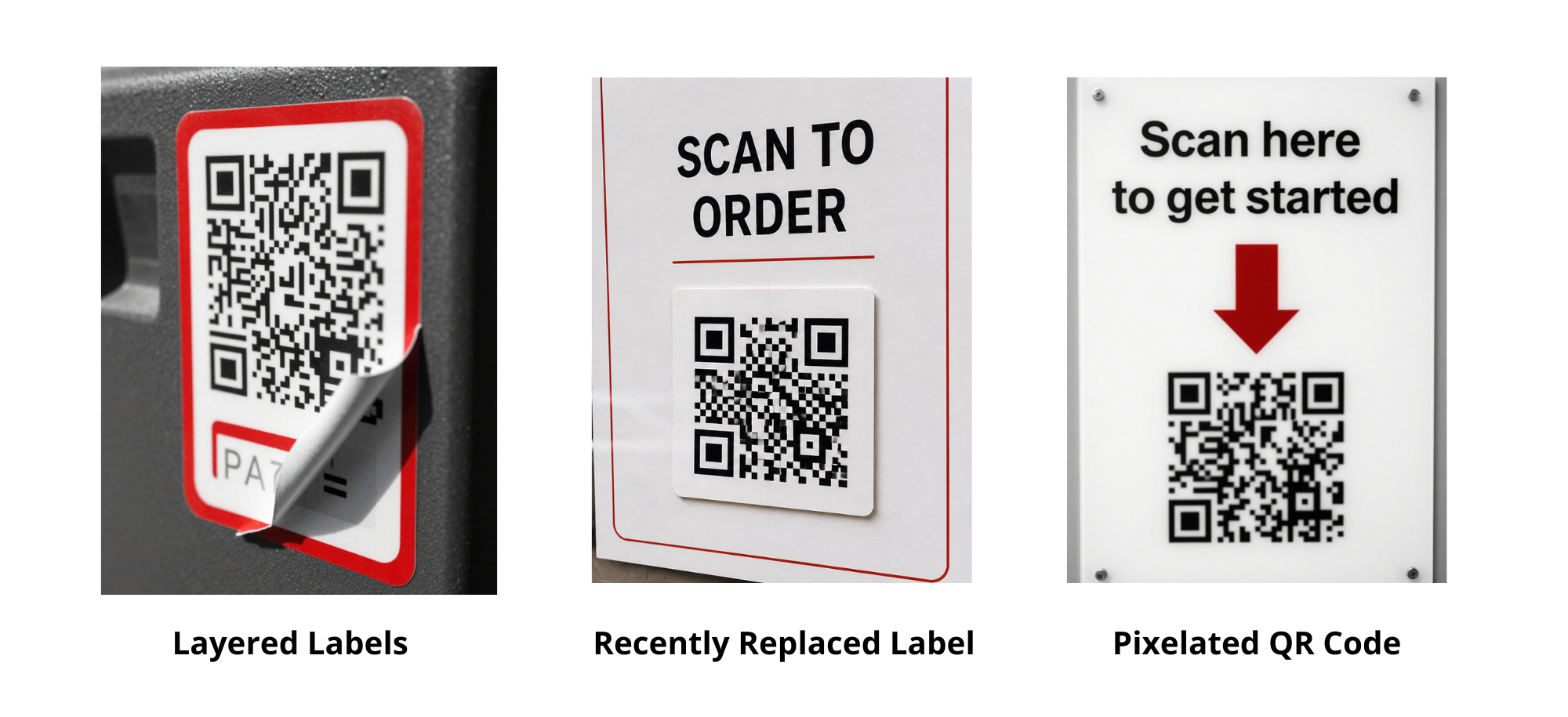
Look for signs of altered QR codes, especially if they’re in publicly accessible locations. Common indicators of tampering include:
-
Layered QR code stickers
-
Labels that look misaligned or recently replaced
-
Low-quality or pixelated printing that doesn’t match surrounding materials
Any of these signs can be a red flag.
3. Double Check the Destination
After scanning a QR code, make sure the destination:
-
Matches the task you expected to complete (e.g., retrieving a package or key)
-
Appears consistent with the organization or workflow you intended to access
-
Doesn’t unexpectedly request credentials, payments, or sensitive information
If anything feels out of place, pause and verify the destination is correct before continuing.
Staying Ahead of Quishing
QR codes are now part of your everyday workflows, which makes scanning them feel routine. That familiarity is exactly what attackers rely on when attempting quishing.
By staying aware of how QR codes are used in your organization and following a few simple best practices, you can reduce risk without slowing down the processes that depend on them.

